5. Advanced Guide to Model Conversion#
5.1. Overview#
pulsar2 build is used for model graph optimization, quantification, compilation and other operations. Its operation diagram is as follows:

pulsar2 builduses the input model (model.onnx), PTQ calibration data (calibration.tar) and configuration file (config.json) to generate the output model (axmodel).The command line parameters of
pulsar2 buildwill overwrite certain corresponding parts in the configuration file, and causepulsar2 buildto output the overwritten configuration file. For a detailed introduction to the configuration file, see 《Configuration file details》.
5.2. Detailed explanation of model compilation#
This section introduces the complete use of the pulsar2 build command.
pulsar2 build -h can display detailed command line parameters:
  1  usage: main.py build [-h] [--config] [--input] [--output_dir] [--output_name]
  2                       [--work_dir] [--model_type] [--target_hardware]
  3                       [--npu_mode] [--input_shapes]
  4                       [--onnx_opt.disable_onnx_optimization ]
  5                       [--onnx_opt.enable_onnxsim ] [--onnx_opt.model_check ]
  6                       [--onnx_opt.disable_transformation_check ]
  7                       [--onnx_opt.save_tensors_data ]
  8                       [--quant.calibration_method]
  9                       [--quant.precision_analysis ]
 10                       [--quant.precision_analysis_method]
 11                       [--quant.precision_analysis_mode]
 12                       [--quant.highest_mix_precision ]
 13                       [--quant.conv_bias_data_type]
 14                       [--quant.refine_weight_threshold]
 15                       [--quant.enable_smooth_quant ]
 16                       [--quant.smooth_quant_threshold]
 17                       [--quant.smooth_quant_strength]
 18                       [--quant.transformer_opt_level]
 19                       [--quant.input_sample_dir] [--quant.ln_scale_data_type]
 20                       [--quant.check] [--quant.disable_auto_refine_scale ]
 21                       [--quant.enable_easy_quant ]
 22                       [--quant.disable_quant_optimization ]
 23                       [--quant.enable_brecq ] [--quant.enable_lsq ]
 24                       [--quant.enable_adaround ] [--quant.finetune_epochs]
 25                       [--quant.finetune_block_size]
 26                       [--quant.finetune_batch_size] [--quant.finetune_lr]
 27                       [--quant.device] [--compiler.static_batch_sizes [...]]
 28                       [--compiler.max_dynamic_batch_size]
 29                       [--compiler.ddr_bw_limit] [--compiler.disable_ir_fix ]
 30                       [--compiler.check] [--compiler.npu_perf ]
 31                       [--compiler.check_mode] [--compiler.check_rtol]
 32                       [--compiler.check_atol]
 33                       [--compiler.check_cosine_simularity]
 34                       [--compiler.check_tensor_black_list [...]]
 35                       [--compiler.enable_slice_mode ]
 36                       [--compiler.enable_tile_mode ]
 37                       [--compiler.enable_data_soft_compression ]
 38                       [--compiler.input_sample_dir]
 39
 40
 41  options:
 42    -h, --help            show this help message and exit
 43    --config              config file path, supported formats: json / yaml /
 44                          toml / prototxt. type: string. required: false.
 45                          default:.
 46    --input               input model file path. type: string. required: true.
 47    --output_dir          axmodel output directory. type: string. required:
 48                          true.
 49    --output_name         rename output axmodel. type: string. required: false.
 50                          default: compiled.axmodel.
 51    --work_dir            temporary data output directory. type: string.
 52                          required: false. default: same with ${output_dir}.
 53    --model_type          input model type. type: enum. required: false.
 54                          default: ONNX. option: ONNX, QuantAxModel, QuantONNX.
 55    --target_hardware     target hardware. type: enum. required: false. default:
 56                          AX650. option: AX650, AX620E, AX615, AX637, AX8860,
 57                          M76H, M57.
 58    --npu_mode            npu mode. while ${target_hardware} is AX650, npu mode
 59                          can be NPU1 / NPU2 / NPU3. while ${target_hardware} is
 60                          AX620E or AX615, npu mode can be NPU1 / NPU2.
 61                          while ${target_hardware} is AX8860, npu mode can be
 62                          NPU1 / NPU2 / NPU4. type: enum. required: false.
 63                          default: NPU1.
 64    --input_shapes        modify model input shape of input model, this feature
 65                          will take effect before the `input_processors`
 66                          configuration. format:
 67                          input1:1x3x224x224;input2:1x1x112x112. type: string.
 68                          required: false. default: .
 69    --onnx_opt.disable_onnx_optimization []
 70                          disable onnx optimization. type: bool. required:
 71                          false. default: false.
 72    --onnx_opt.enable_onnxsim []
 73                          enable onnx simplify by
 74                          https://github.com/inisis/OnnxSlim. type:
 75                          bool. required: false. default: false.
 76    --onnx_opt.model_check []
 77                          enable model check. type: bool. required: false.
 78                          default: false.
 79    --onnx_opt.disable_transformation_check []
 80                          disable transformation check. type: bool. required:
 81                          false. default: false.
 82    --onnx_opt.save_tensors_data []
 83                          save tensors data to optimize memory footprint. type:
 84                          bool. required: false. default: false.
 85    --quant.calibration_method
 86                          quantize calibration method. type: enum. required:
 87                          false. default: MinMax. option: MinMax, Percentile,
 88                          MSE, KL.
 89    --quant.precision_analysis []
 90                          enable quantization precision analysis. type: bool.
 91                          required: false. default: false.
 92    --quant.precision_analysis_method
 93                          precision analysis method. type: enum. required:
 94                          false. default: PerLayer. option: PerLayer, EndToEnd.
 95    --quant.precision_analysis_mode
 96                          precision analysis mode. type: enum. required: false.
 97                          default: Reference. option: Reference, NPUBackend.
 98    --quant.highest_mix_precision []
 99                          enable highest mix precision quantization. type: bool.
100                          required: false. default: false.
101    --quant.conv_bias_data_type
102                          conv bias data type. type: enum. required: false.
103                          default: S32. option: S32, FP32.
104    --quant.refine_weight_threshold
105                          refine weight threshold, should be a legal float
106                          number, like 1e-6. -1 means disable this feature.
107                          type: float. required: false. default: 1e-6.
108                          limitation: 0 or less than 0.0001.
109    --quant.enable_smooth_quant []
110                          enalbe smooth quant strategy. type: bool. required:
111                          false. default: false.
112    --quant.smooth_quant_threshold
113                          smooth quant threshold. The larger the threshold, the
114                          more operators will be involved in performing
115                          SmoothQuant. limitation: 0~1.
116    --quant.smooth_quant_strength
117                          smooth quant strength, a well-balanced point to evenly
118                          split the quantization difficulty.
119    --quant.transformer_opt_level
120                          tranformer opt level. type: int. required: false.
121                          default: 0. limitation: 0~2.
122    --quant.input_sample_dir
123                          input sample data dir for precision analysis. type:
124                          string. required: false. default: .
125    --quant.ln_scale_data_type
126                          LayerNormalization scale data type. type: enum.
127                          required: false. default: FP32. option: FP32, S32,
128                          U32.
129    --quant.check         quant check level, 0: no check; 1: check node dtype.
130                          type: int. required: false. default: 0.
131    --quant.disable_auto_refine_scale []
132                          refine weight scale and input scale, type: bool.
133                          required: false. default: false.
134    --quant.enable_easy_quant []
135                          enable easyquant; type bool. required: false. default:
136                          false.
137    --quant.disable_quant_optimization []
138                          disable quant optimization; type bool. required:
139                          false. default: false.
140    --quant.enable_brecq []
141                          enable brecq quantize strategy; type bool. required:
142                          false. default: false.
143    --quant.enable_lsq []
144                          enable lsq quantize strategy; type bool. required:
145                          false. default: false.
146    --quant.enable_adaround []
147                          enable adaround quantize strategy; type bool.
148                          required: false. default: false.
149    --quant.finetune_epochs
150                          finetune epochs when enable finetune algorithm; type
151                          int32. required: false. default: 500.
152    --quant.finetune_block_size
153                          finetune split block size when enable finetune
154                          algorithm; type int32. required: false. default: 4.
155    --quant.finetune_batch_size
156                          finetune batch size when enable finetune algorithm;
157                          type int32. required: false. default: 1.
158    --quant.finetune_lr   learning rate when enable finetune algorithm; type
159                          float. required: false. default: 1e-3.
160    --quant.device        device for quant calibration. type: string. required:
161                          false. default: cpu. option: cpu, cuda:0, cuda:1, ...,
162                          cuda:7.
163    --compiler.static_batch_sizes [ ...]
164                          static batch sizes. type: int array. required: false.
165                          default: [].
166    --compiler.max_dynamic_batch_size
167                          max dynamic batch. type: int, required: false.
168                          default: 0.
169    --compiler.ddr_bw_limit
170                          ddr bandwidth limit in GB, 0 means no limit. type:
171                          int. required: false. default: 0.
172    --compiler.disable_ir_fix []
173                          disable ir fix, only work in multi-batch compilation.
174                          type: bool. required: false. default: false.
175    --compiler.check      compiler check level, 0: no check; 1: assert all
176                          close; 2: assert all equal; 3: check cosine
177                          simularity. type: int. required: false. default: 0.
178    --compiler.npu_perf []
179                          dump npu perf information for profiling. type: bool.
180                          required: false. default: false.
181    --compiler.check_mode
182                          compiler check mode, CheckOutput: only check model
183                          output; CheckPerLayer: check model intermediate tensor
184                          and output. type: enum. required: false. default:
185                          CheckOutput. option: CheckOutput, CheckPerLayer.
186    --compiler.check_rtol
187                          relative tolerance when check level is 1. type: float.
188                          required: false. default: 1e-5.
189    --compiler.check_atol
190                          absolute tolerance when check level is 1. type: float.
191                          required: false. default: 0.
192    --compiler.check_cosine_simularity
193                          cosine simularity threshold when check level is 3.
194                          type: float. required: false. default: 0.999.
195    --compiler.check_tensor_black_list [ ...]
196                          tensor black list for per layer check, support regex.
197                          type: list of string. required: false. default: [].
198    --compiler.enable_slice_mode []
199                          enable slice mode scheduler. type: bool. required:
200                          false. default: false.
201    --compiler.enable_tile_mode []
202                          enable tile mode scheduler. type: bool. required:
203                          false. default: false.
204    --compiler.enable_data_soft_compression []
205                          enable data soft compression. type: bool. required:
206                          false. default: false.
207    --compiler.input_sample_dir
208                          input sample data dir for compiler check. type:
209                          string. required: false. default: .
Hint
Users can write configuration files in
json / yaml / toml / prototxtformat according to parameter specifications, and point to the configuration file through the command line parameter--configSome compilation parameters support command line input, and have higher priority than configuration files. Use
pulsar2 build -hto view supported command line compilation parameters. For example, the command line parameter--quant.calibration_methodis equivalent to configuring thecalibration_methodfield of theQuantConfigstructure
5.2.1. Detailed explanation of parameters#
- pulsar2 build's parameter explanation
- --config
type of data: string
required or not: yes
description:configuration file path, supports
json/yaml/toml/prototxtformat, see 《Configuration File Detailed Description》 for the structure
- --work_dir
type of data: string
required or not: no
default value: same as output_dir
description: intermediate result output directory
- --input
type of data: string
required or not: yes
description: model enter path
- --output_dir
type of data: string
required or not: yes
description: compilation result output directory, the compiled model is named compiled.axmodel
- --model_type
type of data: enum
required or not: no
default value: ONNX
description: input model type, supports enumeration:
ONNX,QuantAxModel,QuantONNX
- --target_hardware
type of data: enum
required or not: no
default value: AX650
description: the target SoC platform type for model compilation, supporting
AX650,AX620E,AX615,AX637,AX8860,M76H, andM57
- --npu_mode
type of data: enum
required or not: no
default value: NPU1
description: model compilation mode. For the available
npu_modevalues and hardware resources on each chip platform, see {ref}`Chip platforms and available npu_mode values <neutron_platform_npu_mode>`.AX650/M76HsupportNPU1,NPU2, andNPU3.AX620E/AX630C/AX620QsupportNPU1andNPU2.AX615supportsNPU1andNPU2.M57/AX637supportNPU1.AX8860supportsNPU1,NPU2, andNPU4.
Warning
npu_mode refers to the amount of NPU resources used, not a vNPU number.
- --input_shapes
type of data: string
required or not: no
default value: empty
description: during the model compilation process, modify the input size of the model in the format:
input1:1x3x224x224;input2:1x1x112x112.
- --onnx_opt
disable_onnx_optimization
type of data: bool
required or not: no
default value: false
description: whether to enable the floating-point ONNX model graph optimization module.
enable_onnxsim
type of data: bool
required or not: no
default value: false
description: whether to use the onnxslim tool to simplify floating-point ONNX, inisis/OnnxSlim.
model_check
type of data: bool
required or not: no
default value: false
description: whether to enable the bisection function of the floating-point ONNX model graph after optimization with the original ONNX model.
disable_transformation_check
type of data: bool
required or not: no
default value: false
description: whether to disable the subgraph bisection function after each subgraph transformation during floating-point ONNX model graph optimization.
- --quant
In BuildConfig is a member variable named quant
calibration_method
Data type: enum
Required: No
Default value: MinMax
Description: Quantization algorithm, supported enumerations
MinMax/Percentile/MSE/KL, see 《Configuration file details》 for the structure
precision_analysis
Data type: bool
Required: No
Default value: false
Description: Whether to analyze the quantization accuracy of Quant AXModel layer by layer
precision_analysis_method
Data type: enum
Required: No
Default value: PerLayer
Description: Precision analysis method, optional
PerLayer/EndToEnd.PerLayermeans that each layer uses the layer input corresponding to the floating-point model, and calculates the similarity between the output of each layer and the output of the floating-point model.EndToEndmeans that the first layer uses the floating-point model input, and then simulates the complete model, and calculates the similarity between the final output result and the output of the floating-point model.
precision_analysis_mode
Data type: enum
Required: No
Default value: Reference
Description: Implementation of layer-by-layer simulation, optional
Reference/NPUBackend.Referencecan run all models supported by the compiler (supports models containing CPU and NPU subgraphs), but the calculation results will have a small error compared to the final board results (basically the difference is within plus or minus 1, and there is no systematic error).NPUBackendcan run models containing only NPU subgraphs, but the calculation results are bit-aligned with the board results.
highest_mix_precision
type of data: bool
required or not: no
default value: false
description: whether to enable the highest precision quantization mode.
conv_bias_data_type
type of data: enum
required or not: no
default value: S32
description: the data type saved by the Bias attribute of the Conv operator during quantization, optional S32/FP32.
refine_weight_threshold
type of data: float
required or not: no
default value: 1e-6
description: adjusts the weight quantization threshold to the specified value.
enable_smooth_quant
type of data: bool
required or not: no
default value: false
description: enable smooth quant quantization strategy to improve quantization accuracy.
enable_easy_quant
Data type: bool
Required: No
Default value: false
Description: Enable the easyquant quantization algorithm, which is a quantization method for searching weights and activation values with high precision. Currently, it is implemented based on the CPU. After successfully enabling this function, half of the CPU will be occupied and it will take a long time. It is recommended to enable this function when the precision is insufficient and set the number of quantization data sets to more than 32. This quantization algorithm is referenced from https://arxiv.org/abs/2006.16669.
disable_quant_optimization
Data type: bool
Required: No
Default value: false
Description: Disable the graph optimization function of the quantization part. The default value is false. During quantization, certain transformations will be made to the graph to eliminate or merge operators. This function is used to troubleshoot possible problems in the graph optimization process during quantization. Please note that enabling this function may cause a decrease in model performance.
enable_brecq
Data type: bool
Required: No
Default value: false
Description: Whether to enable the BRECQ quantization algorithm.
enable_lsq
Data type: bool
Required: No
Default value: false
Description: Whether to enable the LSQ quantization algorithm.
enable_adaround
Data type: bool
Required: No
Default value: false
Description: Whether to enable the ADAROUND quantization algorithm.
finetune_epochs
Data type: int
Required: No
Default value: 500
Description: Fine-tune the rounds when BRECQ / LSQ / ADAROUND quantization algorithms are enabled.
finetune_block_size
Data type: int
Required: No
Default value: 4
Description: Block size when BRECQ / LSQ / ADAROUND quantization algorithms are enabled.
finetune_batch_size
Data type: int
Required: No
Default value: 4
Description: The batch size to set when enabling BRECQ / LSQ / ADAROUND quantization algorithms.
finetune_lr
Data type: float
Required: No
Default value: 1e-3
Description: Learning rate size when BRECQ / LSQ / ADAROUND quantization algorithm is enabled.
device
Data type: float
Required: No
Default value: cpu
Description: The device type used for calibration during quantization, supporting "cpu", "cuda:0", "cuda:1", "cuda:2", etc.
transformer_opt_level
type of data: int
required or not: no
default value: 0
description: Quantization mode configuration of Transformer network.
input_sample_dir
type of data: string
required or not: no
default value: 空
description: Configures the input data directory used for quantification accuracy analysis. If not specified, data from the quantification calibration set is used.
Note
Note that the format of the input data in
--quant.input_sample_dirshould be the same as the original model.
- --compiler
A member variable named compiler in BuildConfig
static_batch_sizes
type of data: list of int
required or not: no
default value: 0
description: The compiler compiles according to the batch combination provided by the user. Based on this set of batch models, it can support efficient inference of any batch_size input at runtime. For details, please refer to: 《Static multi-batch mode》.
max_dynamic_batch_size
type of data: int
required or not: no
default value: 0
description: The compiler automatically derives a batch model combination that the NPU can run efficiently and is no larger than max_dynamic_batch_size. Based on this set of batch models, efficient inference of any batch_size input can be supported at runtime. For details, please refer to: 《Dynamic multi-batch mode》.
ddr_bw_limit
type of data: float
required or not: No
default value: 0
description:: Set the compile-time emulation ddr bandwidth limit in GB.
disable_ir_fix
type of data: bool
required or not: no
default value: false
description: whether to disable the compiler's default Reshape operator attribute modification behavior during multi-batch compilation.
npu_perf
type of data: bool
required or not: no
default value: false
description:: export debug files during NPU compilation.
check
type of data: int
required or not: no
default value: 0
description: whether to check the correctness of the compilation results through simulation, 0 means no checking; 1 means checking whether the compilation results can run correctly; 2 means checking whether the output data of the model is correct.
check_mode
type of data: enum
required or not: no
default value: 0
description:bisection mode, CheckOutput means that only the result is bisected. CheckPerLayer means bisection layer by layer.
check_rtol
type of data: float
required or not: no
default value: 1e-5
description:this parameter is effective when the --compiler.check parameter is 1. This parameter is the relative error parameter.
check_atol
type of data: float
required or not: no
default value: 0
description:this parameter is effective when the --compiler.check parameter is 1. This parameter is the relative error parameter.
check_cosine_simularity
type of data: float
required or not: no
default value: 0.999
description:this parameter is only valid when the --compiler.check parameter is 3. This parameter specifies the tensor cosine similarity check threshold.
check_tensor_black_list
type of data: list of string
required or not: no
default value: []
description:a list of tensors that are not included in the check. Regular expression matching is supported.
enable_slice_mode
Data type: bool
Required: No
Default value: false
Description: Enable slice mode scheduling strategy, which can greatly reduce the amount of ddr swap data to improve performance in some cases.
enable_tile_mode
Data type: bool
Required: No
Default value: false
Description: Enable tile mode scheduling strategy, which can greatly reduce the amount of ddr swap data to improve performance in some cases.
enable_data_soft_compression
Data type: bool
Required: No
Default value: false
Description: Enables software compression of NPU submodels in compiled.axmodel, which can reduce the size of compiled.axmodel, but will increase model loading time.
input_sample_dir
type of data: string
required or not: no
default value: empty
description: configures the input data directory used for compiler checks. If not specified, quantization calibration data will be used in preference.
Note
Note that the input data in
--compiler.input_sample_dirshould be in the same format as the compiled model (including preprocessing).
5.3. Detailed explanation of multi-core compilation#
Users can flexibly configure the NPU compilation mode by modifying the --npu_mode option in pulsar2 build to make full use of computing power.
5.3.1. NPU single core mode#
The default configuration of --npu_mode is NPU1, which is 1 NPU core mode. The previous 《Model Compilation》 chapter used the default configuration of NPU1 for explanation.
5.3.2. NPU dual core mode#
--npu_mode configuration is modified to NPU2, that is, 2 NPU core mode. Taking the example of converting the mobilenetv2 model, modify the configuration file as follows:
{
  "model_type": "ONNX",
  "npu_mode": "NPU2",   # 只需要修改这里,默认配置是 NPU1
  "quant": {
    "input_configs": [
      {
        "tensor_name": "input",
        "calibration_dataset": "./dataset/imagenet-32-images.tar",
        "calibration_size": 32,
        "calibration_mean": [103.939, 116.779, 123.68],
        "calibration_std": [58.0, 58.0, 58.0]
      }
    ],
    "calibration_method": "MinMax",
    "precision_analysis": false
  },
  "input_processors": [
    {
      "tensor_name": "input",
      "tensor_format": "BGR",
      "src_format": "BGR",
      "src_dtype": "U8",
      "src_layout": "NHWC",
      "csc_mode": "NoCSC"
    }
  ],
  "compiler": {
    "check": 0
  }
}
The compilation command of pulsar2 build as follows:
root@xxx:/data# pulsar2 build --input model/mobilenetv2-sim.onnx --output_dir output --config config/mobilenet_v2_build_config.json
5.4. Detailed explanation of multi-batch compilation#
pulsar2 build supports users to configure the batch_size of the model, which is divided into two modes: static multi-batch and dynamic multi-batch compilation. These two modes are mutually exclusive. This chapter uses AX650 as an example.
5.4.1. Static multi-batch mode#
The compiler compiles according to the batch combination provided by the user, and supports two ways of configuring the command line parameter --compiler.static_batch_sizes and modifying compiler.static_batch_sizes in the configuration file.
After setting up static multi-batch compilation, when viewing
compiled.axmodelthroughonnx inspect -m -n -t, the batch dimension of the input and output shape will become the maximum batch specified by the user.Weight data will be reused as much as possible between batches, so the model size is smaller than the sum of the model sizes of each batch compiled separately.
Hint
Taking the mobilenetv2 model as an example, the original model input input shape is [1, 224, 224, 3],
After static multi-batch compilation with static_batch_sizes equal to [1, 2, 4], the shape will become [4, 224, 224, 3].
5.4.2. Dynamic multi-batch mode#
The compiler automatically derives a batch model combination that the NPU can run efficiently and is no larger than max_dynamic_batch_size. Based on this set of batch models, efficient inference of any batch_size input can be supported at runtime. Supports two ways of configuring the command line parameter --compiler.max_dynamic_batch_size and modifying compiler.max_dynamic_batch_size in the configuration file.
The compiler will start from batch 1 and compile in 2-fold increments. It will stop when the batch is larger than the set
max_dynamic_batch_sizeor the theoretical reasoning efficiency of the current batch is lower than that of the previous batch.Batch theoretical reasoning efficiency: theoretical reasoning takes / batch_size.
Weight data will be reused as much as possible between batches, so the model size is smaller than the sum of the model sizes of each batch compiled separately.
After setting up dynamic multi-batch compilation, when viewing
compiled.axmodelthroughonnx inspect -m -n -t, the batch dimension of the input and output shape will becomemax_dynamic_batch_size.
Hint
Taking the mobilenetv2 model as an example, the original model input input shape is [1, 224, 224, 3],
After doing a dynamic multi-batch compilation with max_dynamic_batch_size equal to 4, the shape will become [4, 224, 224, 3].
When running, it will find the appropriate batch combination and perform multiple inferences based on the dynamic batch size set by the caller during inference.
Hint
When the theoretical inference efficiency of a model increases as the number of batches increases and there is only one NPU subgraph after compilation and max_dynamic_batch_size is set to 4, the compiled compiled.axmodel will contain [1, 2 , 4] model of three batches.
When reasoning or simulating:
If the dynamic batch value is set to 3, the
axengine inference frameworkandpulsar2 run emulatorwill internally perform batch 2 + batch 1 twice for NPU inference or simulation.If the dynamic batch value is set to 9, the
axengine inference frameworkandpulsar2 run emulatorwill perform batch 4 + batch 4 + batch 1 three times of NPU inference or simulation internally.
During dynamic multi-batch compilation, the following logs will show the compiled batch combinations:
...
2023-07-09 20:06:02.690 | INFO     | yamain.command.build:compile_npu_subgraph:985 - QuantAxModel macs: 280,262,480
2023-07-09 20:06:06.786 | WARNING  | yamain.command.build:compile_npu_subgraph:1035 - graph [subgraph_npu_0] batchs [1, 2]
2023-07-09 20:06:06.795 | INFO     | yamain.command.build:compile_ptq_model:924 - fuse 1 subgraph(s)
5.4.3. Multi-batch compilation of models containing the Reshape operator#
If the model contains the Reshape operator, pulsar2 may not be able to correctly infer the output shape of the Reshape operator when performing multi-batch compilation.
At this time, the user can modify the shape input data of the Reshape operator through the 《Constant Data Modification》 function, so that pulsar2 can be correct during the multi-batch compilation process. Derive the output shape.
For example, there is a Reshape operator with a shape of [2, 1, 64]. Assuming that the first dimension is batch, the constant tensor corresponding to the shape is modified to [ through the constant data modification function. 2, -1, 64] or [2, 0, 64] to support multi-batch compilation.
In addition, if the user does not explicitly configure the operator attribute modification, then pulsar2 will modify the 0th dimension of the Reshape operator**shape to -1, and try to perform multi-batch compilation**.
Hint
pulsar2 supports configuring 0 or -1 in the shape of Reshape. 0 represents the same value as the corresponding dimension of the input tensor; -1 represents the unknown dimension size calculated based on the input tensor.
5.5. Detailed explanation layer by layer#
pulsar2 build provides a set of layer-by-layer accuracy comparison tools between floating-point models and quantized models. There are two ways to configure it, just choose one:
Configure
--quant.precision_analysis 1on the command line to enable the precision comparison function; the following is an example:
root@xxx:/data/quick_start_example# pulsar2 build --input model/mobilenetv2-sim.onnx --output_dir output --config config/config_mobilenet_v2_onnx.json --quant.precision_analysis 1
The compilation command remains unchanged, and
"precision_analysis": falseis modified to"precision_analysis": truein the configuration file:
{
  "model_type": "ONNX",
  "npu_mode": "NPU1",
  "quant": {
    "input_configs": [
      {
        "tensor_name": "input",
        "calibration_dataset": "./dataset/imagenet-32-images.tar",
        "calibration_size": 32,
        "calibration_mean": [103.939, 116.779, 123.68],
        "calibration_std": [58.0, 58.0, 58.0]
      }
    ],
    "calibration_method": "MinMax",
    "precision_analysis": true  # 这里修改为 true, 默认是 false
  },
  "input_processors": [
    {
      "tensor_name": "input",
      "tensor_format": "BGR",
      "src_format": "BGR",
      "src_dtype": "U8",
      "src_layout": "NHWC",
      "csc_mode": "NoCSC"
    }
  ],
  "compiler": {
    "check": 0
  }
}
After re-executing the compilation process, you can get the following output information with Quant Precision Table, including node name, type, output name, data type, output shape, cosine similarity, etc.:
At the same time, a quantized similarity graph file in mmd format will be saved. Different similarities can be distinguished by color, which can more intuitively locate precision problems. The file path can be found through the save precision analysis graph to keyword in the log.
root@xxx:/data# pulsar2 build --input model/mobilenetv2-sim.onnx --output_dir output --config config/mobilenet_v2_build_config.json
...

Building native ━━━━━━━━━━━━━━━━━━━━━━━━━━━━━━━━━━━━━━━━ 100% 0:00:00
                                             Quant Precision Table【PerLayer Reference】
┏━━━━━━━━━━━━━━━━━━━━━━━━━┳━━━━━━━━━━━━━━━━━━━━━━━━┳━━━━━━━━━━━━━━━┳━━━━━━━━━━━━━━━━━━━┳━━━━━━━┳━━━━━━━━┳━━━━━━━━━┳━━━━━━━━━┓
┃ Operator                ┃          Type          ┃ Output Tensor ┃       Shape       ┃ DType ┃ QDType ┃ Cosin   ┃ MSE     ┃
┡━━━━━━━━━━━━━━━━━━━━━━━━━╇━━━━━━━━━━━━━━━━━━━━━━━━╇━━━━━━━━━━━━━━━╇━━━━━━━━━━━━━━━━━━━╇━━━━━━━╇━━━━━━━━╇━━━━━━━━━╇━━━━━━━━━┩
│ Conv_0                  │    AxQuantizedConv     │ 317           │ (1, 32, 112, 112) │ FP32  │   U8   │ 0.99993 │ 0.00003 │
├─────────────────────────┼────────────────────────┼───────────────┼───────────────────┼───────┼────────┼─────────┼─────────┤
│ Conv_2                  │    AxQuantizedConv     │ 320           │ (1, 32, 112, 112) │ FP32  │   U8   │ 0.99945 │ 0.00070 │
├─────────────────────────┼────────────────────────┼───────────────┼───────────────────┼───────┼────────┼─────────┼─────────┤
│ Conv_4                  │    AxQuantizedConv     │ 480           │ (1, 16, 112, 112) │ FP32  │   U8   │ 0.99904 │ 0.00046 │
├─────────────────────────┼────────────────────────┼───────────────┼───────────────────┼───────┼────────┼─────────┼─────────┤
│ Conv_5                  │    AxQuantizedConv     │ 325           │ (1, 96, 112, 112) │ FP32  │   U8   │ 0.99939 │ 0.00008 │
├─────────────────────────┼────────────────────────┼───────────────┼───────────────────┼───────┼────────┼─────────┼─────────┤
│ Conv_7                  │    AxQuantizedConv     │ 328           │  (1, 96, 56, 56)  │ FP32  │   U8   │ 0.99919 │ 0.00020 │
├─────────────────────────┼────────────────────────┼───────────────┼───────────────────┼───────┼────────┼─────────┼─────────┤
│ Conv_9                  │    AxQuantizedConv     │ 489           │  (1, 24, 56, 56)  │ FP32  │   U8   │ 0.99912 │ 0.00027 │
├─────────────────────────┼────────────────────────┼───────────────┼───────────────────┼───────┼────────┼─────────┼─────────┤
│ Conv_10                 │    AxQuantizedConv     │ 333           │ (1, 144, 56, 56)  │ FP32  │   U8   │ 0.99982 │ 0.00002 │
├─────────────────────────┼────────────────────────┼───────────────┼───────────────────┼───────┼────────┼─────────┼─────────┤
│ Conv_12                 │    AxQuantizedConv     │ 336           │ (1, 144, 56, 56)  │ FP32  │   U8   │ 0.99957 │ 0.00005 │
├─────────────────────────┼────────────────────────┼───────────────┼───────────────────┼───────┼────────┼─────────┼─────────┤
│ Conv_14                 │    AxQuantizedConv     │ 498           │  (1, 24, 56, 56)  │ FP32  │   U8   │ 0.99933 │ 0.00026 │
├─────────────────────────┼────────────────────────┼───────────────┼───────────────────┼───────┼────────┼─────────┼─────────┤
│ Add_15                  │     AxQuantizedAdd     │ 339           │  (1, 24, 56, 56)  │ FP32  │   U8   │ 0.99930 │ 0.00050 │
├─────────────────────────┼────────────────────────┼───────────────┼───────────────────┼───────┼────────┼─────────┼─────────┤
│ Conv_16                 │    AxQuantizedConv     │ 342           │ (1, 144, 56, 56)  │ FP32  │   U8   │ 0.99969 │ 0.00002 │
├─────────────────────────┼────────────────────────┼───────────────┼───────────────────┼───────┼────────┼─────────┼─────────┤
│ Conv_18                 │    AxQuantizedConv     │ 345           │ (1, 144, 28, 28)  │ FP32  │   U8   │ 0.99979 │ 0.00004 │
├─────────────────────────┼────────────────────────┼───────────────┼───────────────────┼───────┼────────┼─────────┼─────────┤
│ Conv_20                 │    AxQuantizedConv     │ 507           │  (1, 32, 28, 28)  │ FP32  │   U8   │ 0.99970 │ 0.00013 │
├─────────────────────────┼────────────────────────┼───────────────┼───────────────────┼───────┼────────┼─────────┼─────────┤
│ Conv_21                 │    AxQuantizedConv     │ 350           │ (1, 192, 28, 28)  │ FP32  │   U8   │ 0.99989 │ 0.00001 │
├─────────────────────────┼────────────────────────┼───────────────┼───────────────────┼───────┼────────┼─────────┼─────────┤
│ Conv_23                 │    AxQuantizedConv     │ 353           │ (1, 192, 28, 28)  │ FP32  │   U8   │ 0.99936 │ 0.00003 │
├─────────────────────────┼────────────────────────┼───────────────┼───────────────────┼───────┼────────┼─────────┼─────────┤
│ Conv_25                 │    AxQuantizedConv     │ 516           │  (1, 32, 28, 28)  │ FP32  │   U8   │ 0.99955 │ 0.00008 │
├─────────────────────────┼────────────────────────┼───────────────┼───────────────────┼───────┼────────┼─────────┼─────────┤
│ Add_26                  │     AxQuantizedAdd     │ 356           │  (1, 32, 28, 28)  │ FP32  │   U8   │ 0.99969 │ 0.00020 │
├─────────────────────────┼────────────────────────┼───────────────┼───────────────────┼───────┼────────┼─────────┼─────────┤
│ Conv_27                 │    AxQuantizedConv     │ 359           │ (1, 192, 28, 28)  │ FP32  │   U8   │ 0.99989 │ 0.00000 │
├─────────────────────────┼────────────────────────┼───────────────┼───────────────────┼───────┼────────┼─────────┼─────────┤
│ Conv_29                 │    AxQuantizedConv     │ 362           │ (1, 192, 28, 28)  │ FP32  │   U8   │ 0.99974 │ 0.00001 │
├─────────────────────────┼────────────────────────┼───────────────┼───────────────────┼───────┼────────┼─────────┼─────────┤
│ Conv_31                 │    AxQuantizedConv     │ 525           │  (1, 32, 28, 28)  │ FP32  │   U8   │ 0.99950 │ 0.00006 │
├─────────────────────────┼────────────────────────┼───────────────┼───────────────────┼───────┼────────┼─────────┼─────────┤
│ Add_32                  │     AxQuantizedAdd     │ 365           │  (1, 32, 28, 28)  │ FP32  │   U8   │ 0.99966 │ 0.00026 │
├─────────────────────────┼────────────────────────┼───────────────┼───────────────────┼───────┼────────┼─────────┼─────────┤
│ Conv_33                 │    AxQuantizedConv     │ 368           │ (1, 192, 28, 28)  │ FP32  │   U8   │ 0.99984 │ 0.00001 │
├─────────────────────────┼────────────────────────┼───────────────┼───────────────────┼───────┼────────┼─────────┼─────────┤
│ Conv_35                 │    AxQuantizedConv     │ 371           │ (1, 192, 14, 14)  │ FP32  │   U8   │ 0.99991 │ 0.00002 │
├─────────────────────────┼────────────────────────┼───────────────┼───────────────────┼───────┼────────┼─────────┼─────────┤
│ Conv_37                 │    AxQuantizedConv     │ 534           │  (1, 64, 14, 14)  │ FP32  │   U8   │ 0.99968 │ 0.00012 │
├─────────────────────────┼────────────────────────┼───────────────┼───────────────────┼───────┼────────┼─────────┼─────────┤
│ Conv_38                 │    AxQuantizedConv     │ 376           │ (1, 384, 14, 14)  │ FP32  │   U8   │ 0.99994 │ 0.00000 │
├─────────────────────────┼────────────────────────┼───────────────┼───────────────────┼───────┼────────┼─────────┼─────────┤
│ Conv_40                 │    AxQuantizedConv     │ 379           │ (1, 384, 14, 14)  │ FP32  │   U8   │ 0.99975 │ 0.00001 │
├─────────────────────────┼────────────────────────┼───────────────┼───────────────────┼───────┼────────┼─────────┼─────────┤
│ Conv_42                 │    AxQuantizedConv     │ 543           │  (1, 64, 14, 14)  │ FP32  │   U8   │ 0.99979 │ 0.00004 │
├─────────────────────────┼────────────────────────┼───────────────┼───────────────────┼───────┼────────┼─────────┼─────────┤
│ Add_43                  │     AxQuantizedAdd     │ 382           │  (1, 64, 14, 14)  │ FP32  │   U8   │ 0.99976 │ 0.00011 │
├─────────────────────────┼────────────────────────┼───────────────┼───────────────────┼───────┼────────┼─────────┼─────────┤
│ Conv_44                 │    AxQuantizedConv     │ 385           │ (1, 384, 14, 14)  │ FP32  │   U8   │ 0.99994 │ 0.00000 │
├─────────────────────────┼────────────────────────┼───────────────┼───────────────────┼───────┼────────┼─────────┼─────────┤
│ Conv_46                 │    AxQuantizedConv     │ 388           │ (1, 384, 14, 14)  │ FP32  │   U8   │ 0.99985 │ 0.00001 │
├─────────────────────────┼────────────────────────┼───────────────┼───────────────────┼───────┼────────┼─────────┼─────────┤
│ Conv_48                 │    AxQuantizedConv     │ 552           │  (1, 64, 14, 14)  │ FP32  │   U8   │ 0.99973 │ 0.00003 │
├─────────────────────────┼────────────────────────┼───────────────┼───────────────────┼───────┼────────┼─────────┼─────────┤
│ Add_49                  │     AxQuantizedAdd     │ 391           │  (1, 64, 14, 14)  │ FP32  │   U8   │ 0.99973 │ 0.00013 │
├─────────────────────────┼────────────────────────┼───────────────┼───────────────────┼───────┼────────┼─────────┼─────────┤
│ Conv_50                 │    AxQuantizedConv     │ 394           │ (1, 384, 14, 14)  │ FP32  │   U8   │ 0.99989 │ 0.00000 │
├─────────────────────────┼────────────────────────┼───────────────┼───────────────────┼───────┼────────┼─────────┼─────────┤
│ Conv_52                 │    AxQuantizedConv     │ 397           │ (1, 384, 14, 14)  │ FP32  │   U8   │ 0.99954 │ 0.00002 │
├─────────────────────────┼────────────────────────┼───────────────┼───────────────────┼───────┼────────┼─────────┼─────────┤
│ Conv_54                 │    AxQuantizedConv     │ 561           │  (1, 64, 14, 14)  │ FP32  │   U8   │ 0.99893 │ 0.00016 │
├─────────────────────────┼────────────────────────┼───────────────┼───────────────────┼───────┼────────┼─────────┼─────────┤
│ Add_55                  │     AxQuantizedAdd     │ 400           │  (1, 64, 14, 14)  │ FP32  │   U8   │ 0.99954 │ 0.00024 │
├─────────────────────────┼────────────────────────┼───────────────┼───────────────────┼───────┼────────┼─────────┼─────────┤
│ Conv_56                 │    AxQuantizedConv     │ 403           │ (1, 384, 14, 14)  │ FP32  │   U8   │ 0.99987 │ 0.00000 │
├─────────────────────────┼────────────────────────┼───────────────┼───────────────────┼───────┼────────┼─────────┼─────────┤
│ Conv_58                 │    AxQuantizedConv     │ 406           │ (1, 384, 14, 14)  │ FP32  │   U8   │ 0.99984 │ 0.00002 │
├─────────────────────────┼────────────────────────┼───────────────┼───────────────────┼───────┼────────┼─────────┼─────────┤
│ Conv_60                 │    AxQuantizedConv     │ 570           │  (1, 96, 14, 14)  │ FP32  │   U8   │ 0.99963 │ 0.00007 │
├─────────────────────────┼────────────────────────┼───────────────┼───────────────────┼───────┼────────┼─────────┼─────────┤
│ Conv_61                 │    AxQuantizedConv     │ 411           │ (1, 576, 14, 14)  │ FP32  │   U8   │ 0.99982 │ 0.00000 │
├─────────────────────────┼────────────────────────┼───────────────┼───────────────────┼───────┼────────┼─────────┼─────────┤
│ Conv_63                 │    AxQuantizedConv     │ 414           │ (1, 576, 14, 14)  │ FP32  │   U8   │ 0.99934 │ 0.00003 │
├─────────────────────────┼────────────────────────┼───────────────┼───────────────────┼───────┼────────┼─────────┼─────────┤
│ Conv_65                 │    AxQuantizedConv     │ 579           │  (1, 96, 14, 14)  │ FP32  │   U8   │ 0.99818 │ 0.00018 │
├─────────────────────────┼────────────────────────┼───────────────┼───────────────────┼───────┼────────┼─────────┼─────────┤
│ Add_66                  │     AxQuantizedAdd     │ 417           │  (1, 96, 14, 14)  │ FP32  │   U8   │ 0.99941 │ 0.00016 │
├─────────────────────────┼────────────────────────┼───────────────┼───────────────────┼───────┼────────┼─────────┼─────────┤
│ Conv_67                 │    AxQuantizedConv     │ 420           │ (1, 576, 14, 14)  │ FP32  │   U8   │ 0.99895 │ 0.00002 │
├─────────────────────────┼────────────────────────┼───────────────┼───────────────────┼───────┼────────┼─────────┼─────────┤
│ Conv_69                 │    AxQuantizedConv     │ 423           │ (1, 576, 14, 14)  │ FP32  │   U8   │ 0.99857 │ 0.00006 │
├─────────────────────────┼────────────────────────┼───────────────┼───────────────────┼───────┼────────┼─────────┼─────────┤
│ Conv_71                 │    AxQuantizedConv     │ 588           │  (1, 96, 14, 14)  │ FP32  │   U8   │ 0.99615 │ 0.00052 │
├─────────────────────────┼────────────────────────┼───────────────┼───────────────────┼───────┼────────┼─────────┼─────────┤
│ Add_72                  │     AxQuantizedAdd     │ 426           │  (1, 96, 14, 14)  │ FP32  │   U8   │ 0.99804 │ 0.00078 │
├─────────────────────────┼────────────────────────┼───────────────┼───────────────────┼───────┼────────┼─────────┼─────────┤
│ Conv_73                 │    AxQuantizedConv     │ 429           │ (1, 576, 14, 14)  │ FP32  │   U8   │ 0.99914 │ 0.00002 │
├─────────────────────────┼────────────────────────┼───────────────┼───────────────────┼───────┼────────┼─────────┼─────────┤
│ Conv_75                 │    AxQuantizedConv     │ 432           │  (1, 576, 7, 7)   │ FP32  │   U8   │ 0.99953 │ 0.00005 │
├─────────────────────────┼────────────────────────┼───────────────┼───────────────────┼───────┼────────┼─────────┼─────────┤
│ Conv_77                 │    AxQuantizedConv     │ 597           │  (1, 160, 7, 7)   │ FP32  │   U8   │ 0.99265 │ 0.00047 │
├─────────────────────────┼────────────────────────┼───────────────┼───────────────────┼───────┼────────┼─────────┼─────────┤
│ Conv_78                 │    AxQuantizedConv     │ 437           │  (1, 960, 7, 7)   │ FP32  │   U8   │ 0.99659 │ 0.00008 │
├─────────────────────────┼────────────────────────┼───────────────┼───────────────────┼───────┼────────┼─────────┼─────────┤
│ Conv_80                 │    AxQuantizedConv     │ 440           │  (1, 960, 7, 7)   │ FP32  │   U8   │ 0.99807 │ 0.00007 │
├─────────────────────────┼────────────────────────┼───────────────┼───────────────────┼───────┼────────┼─────────┼─────────┤
│ Conv_82                 │    AxQuantizedConv     │ 606           │  (1, 160, 7, 7)   │ FP32  │   U8   │ 0.99201 │ 0.00042 │
├─────────────────────────┼────────────────────────┼───────────────┼───────────────────┼───────┼────────┼─────────┼─────────┤
│ Add_83                  │     AxQuantizedAdd     │ 443           │  (1, 160, 7, 7)   │ FP32  │   U8   │ 0.98304 │ 0.00211 │
├─────────────────────────┼────────────────────────┼───────────────┼───────────────────┼───────┼────────┼─────────┼─────────┤
│ Conv_84                 │    AxQuantizedConv     │ 446           │  (1, 960, 7, 7)   │ FP32  │   U8   │ 0.99485 │ 0.00011 │
├─────────────────────────┼────────────────────────┼───────────────┼───────────────────┼───────┼────────┼─────────┼─────────┤
│ Conv_86                 │    AxQuantizedConv     │ 449           │  (1, 960, 7, 7)   │ FP32  │   U8   │ 0.99866 │ 0.00007 │
├─────────────────────────┼────────────────────────┼───────────────┼───────────────────┼───────┼────────┼─────────┼─────────┤
│ Conv_88                 │    AxQuantizedConv     │ 615           │  (1, 160, 7, 7)   │ FP32  │   U8   │ 0.98717 │ 0.00190 │
├─────────────────────────┼────────────────────────┼───────────────┼───────────────────┼───────┼────────┼─────────┼─────────┤
│ Add_89                  │     AxQuantizedAdd     │ 452           │  (1, 160, 7, 7)   │ FP32  │   U8   │ 0.97100 │ 0.00809 │
├─────────────────────────┼────────────────────────┼───────────────┼───────────────────┼───────┼────────┼─────────┼─────────┤
│ Conv_90                 │    AxQuantizedConv     │ 455           │  (1, 960, 7, 7)   │ FP32  │   U8   │ 0.98869 │ 0.00006 │
├─────────────────────────┼────────────────────────┼───────────────┼───────────────────┼───────┼────────┼─────────┼─────────┤
│ Conv_92                 │    AxQuantizedConv     │ 458           │  (1, 960, 7, 7)   │ FP32  │   U8   │ 0.99952 │ 0.00002 │
├─────────────────────────┼────────────────────────┼───────────────┼───────────────────┼───────┼────────┼─────────┼─────────┤
│ Conv_94                 │    AxQuantizedConv     │ 624           │  (1, 320, 7, 7)   │ FP32  │   U8   │ 0.99873 │ 0.00012 │
├─────────────────────────┼────────────────────────┼───────────────┼───────────────────┼───────┼────────┼─────────┼─────────┤
│ Conv_95                 │    AxQuantizedConv     │ 463           │  (1, 1280, 7, 7)  │ FP32  │   U8   │ 0.99990 │ 0.00024 │
├─────────────────────────┼────────────────────────┼───────────────┼───────────────────┼───────┼────────┼─────────┼─────────┤
│ GlobalAveragePool_97    │ AxQuantizedGlobAvgPool │ 464           │  (1, 1280, 1, 1)  │ FP32  │   U8   │ 0.99998 │ 0.00002 │
├─────────────────────────┼────────────────────────┼───────────────┼───────────────────┼───────┼────────┼─────────┼─────────┤
│ Reshape_103             │       AxReshape        │ 472           │     (1, 1280)     │ FP32  │   U8   │ 0.99998 │ 0.00002 │
├─────────────────────────┼────────────────────────┼───────────────┼───────────────────┼───────┼────────┼─────────┼─────────┤
│ output_DequantizeLinear │   AxDequantizeLinear   │ output        │     (1, 1000)     │ FP32  │  FP32  │ 0.99990 │ 0.00173 │
└─────────────────────────┴────────────────────────┴───────────────┴───────────────────┴───────┴────────┴─────────┴─────────┘
2024-09-25 11:47:01.640 | INFO     | yamain.command.precision_analysis:quant_precision_analysis:401 - save precision analysis table to [output/quant/debug/precision_analysis_table.txt]
2024-09-25 11:47:01.641 | INFO     | yamain.command.precision_analysis:quant_precision_analysis:409 - save precision analysis graph to [output/quant/debug/precision_analysis.mmd]
...
Open the output/quant/debug/precision_analysis.mmd file with an editing tool that supports mermaid flowchart and you can see the following quantitative similarity graph

Hint
For more details, please refer to 《Quantitative Precision Analysis Parameter Description》.
Note
If "precision_analysis": false is in the configuration file and the compilation command contains --quant.precision_analysis 1, the precision comparison function will still be enabled.
5.6. Detailed explanation of loading custom data sets#
In general, the model input is in RGB color space, and calibration_format is set to Image by default or set. When loading data during the quantization calibration process, the images in the calibration set will be normalized and scaled first.
If the input is not in RGB color space, it is difficult for the toolchain to perceive what preprocessing needs to be done. pulsar2 build also supports loading user-defined datasets for quantization, and supports file formats with .npy and .bin suffixes.
calibration_format supports four formats: Image Numpy Binary NumpyObject.
Note
When using the quantized data formats of Numpy Binary NumpyObject, the toolchain will directly load the data for quantization without preprocessing. Users are required to complete the data preprocessing by themselves to ensure that the data in the calibration set can be directly input into the model for inference and obtain correct results.
5.6.1. Prepare dataset#
When using a custom dataset, the recommended process for preparing the calibration dataset is as follows:
Preprocess the data
The preprocessing process should be strictly consistent with the processing process during inference
The data type and shape of the calibration data must be exactly the same as the model input
Save the calibration data in
.npyor.binformat and compress it.
Note
The npy suffix file refers to a file saved in the Numpy array format. When using this file format, you need to ensure that the data type and shape of the array when saving are consistent with the corresponding model input, and the suffix name is . npy.
The bin suffix file refers to a file saved in binary format. When using this file format, the data should be saved in binary with the suffix .bin.
5.6.2. Configuration and compilation#
Modify the quant.input_configs.calibration_format field to Numpy or Binary. A complete example is as follows:
{
  "model_type": "ONNX",
  "npu_mode": "NPU1",
  "quant": {
    "input_configs": [
      {
        "tensor_name": "input",
        "calibration_dataset": "./dataset/npy_dataset.tar",
        "calibration_size": 10,
        "calibration_format": "Numpy", # 修改为 Numpy 或者 Binary, 默认是Image
      }
    ],
    "calibration_method": "MinMax",
  },
  "input_processors": [
    {
      "tensor_name": "input",
      "tensor_format": "BGR",
      "src_format": "BGR",
      "src_dtype": "U8",
      "src_layout": "NHWC",
      "csc_mode": "NoCSC"
    }
  ],
  "compiler": {
    "check": 0
  }
}
After compilation is executed, the Data Format field in Quant Config Table is changed to Numpy. The result is as follows:
root@aa:/data/quick_start_example# pulsar2 build --input model/mobilenetv2-sim.onnx --output_dir npy_output/ --config config/npy_config_mobilenet_v2_onnx.json
...
                                                                        Quant Config Table
┏━━━━━━━┳━━━━━━━━━━━━━━━━━━┳━━━━━━━━━━━━━━━━━━━┳━━━━━━━━━━━━━┳━━━━━━━━━━━━━━━┳━━━━━━━━━━━━━━━━━━━━━━━━━━━━━━━━━━━━━━━━━━━━━━━━━━━━━━━━━━━━━━┳━━━━━━━━━━━━━━━━━━━━┓
┃ Input ┃ Shape            ┃ Dataset Directory ┃ Data Format ┃ Tensor Format ┃ Mean                                                         ┃ Std                ┃
┡━━━━━━━╇━━━━━━━━━━━━━━━━━━╇━━━━━━━━━━━━━━━━━━━╇━━━━━━━━━━━━━╇━━━━━━━━━━━━━━━╇━━━━━━━━━━━━━━━━━━━━━━━━━━━━━━━━━━━━━━━━━━━━━━━━━━━━━━━━━━━━━━╇━━━━━━━━━━━━━━━━━━━━┩
│ input │ [1, 3, 224, 224] │ input             │ Numpy       │ BGR           │ [103.93900299072266, 116.77899932861328, 123.68000030517578] │ [58.0, 58.0, 58.0] │
└───────┴──────────────────┴───────────────────┴─────────────┴───────────────┴──────────────────────────────────────────────────────────────┴────────────────────┘
...
5.7. Cascaded model adaptation#
In a cascaded-model workflow, the input to a downstream model usually comes from the quantized output of an upstream model. The runtime input is therefore quantized integer data such as U8, S8, U16, or S16. Explicitly describe the quantization parameters of this input in the downstream model's input_processors so that the compiled compiled.axmodel interprets the input data using the upstream output's scale and zeropoint.
input_processors.scale and input_processors.zeropoint describe the dequantization parameters of the runtime input. When scale is set to 0 or omitted, the toolchain retains its historical default behavior and uses scale=1 and zeropoint=0. zeropoint takes effect only when scale is nonzero.
Attention
quant.input_configs.calibration_mean and calibration_std normalize quantization calibration data. Do not use them to represent the runtime input quantization parameters of a cascaded model. Configure the cascaded input's scale and zeropoint in input_processors.
5.7.1. Basic configuration#
The following example describes a downstream model whose original input is an FP32 NCHW tensor. At runtime, the upstream model supplies a U8 NCHW tensor whose quantization parameters are scale=0.25 and zeropoint=9:
{
  "model_type": "ONNX",
  "npu_mode": "NPU1",
  "quant": {
    "input_configs": [
      {
        "tensor_name": "input",
        "calibration_dataset": "./dataset/input_tensor.tar",
        "calibration_size": 32,
        "calibration_format": "Numpy"
      }
    ],
    "calibration_method": "MinMax",
    "precision_analysis": false
  },
  "input_processors": [
    {
      "tensor_name": "input",
      "tensor_format": "BGR",
      "tensor_layout": "NCHW",
      "src_format": "BGR",
      "src_layout": "NCHW",
      "src_dtype": "U8",
      "scale": 0.25,
      "zeropoint": 9
    }
  ],
  "compiler": {
    "check": 0
  }
}
Note
In production, use a calibration dataset that matches the actual input distribution of the downstream model. If the calibration data is already a model-input tensor, use the Numpy, Binary, or NumpyObject format and do not configure calibration_mean or calibration_std.
5.7.2. Relationship with preprocessing operators#
scale and zeropoint can be used together with layout conversion, normalization, and other preprocessing settings in input_processors:
When
src_layoutdiffers fromtensor_layout, the toolchain insertsAxTranspose.scaleandzeropointare retained in the subsequent quantized-input processing operator.When
meanandstdare configured ininput_processors, the toolchain insertsAxQuantizedNormalizeV2and writesinput_scalesandinput_zeropointsto that operator.For cascaded-model adaptation, configuring the downstream model's runtime input as
YUV420SPorYVU420SPis not recommended. A downstream model should normally receive the upstream model's quantized output tensor directly and use that tensor's actual layout, dtype,scale, andzeropoint.
For example, if the runtime input uses NHWC while the original model input uses NCHW, set only src_layout to NHWC:
{
  "input_processors": [
    {
      "tensor_name": "input",
      "tensor_format": "BGR",
      "tensor_layout": "NCHW",
      "src_format": "BGR",
      "src_layout": "NHWC",
      "src_dtype": "U8",
      "scale": 0.25,
      "zeropoint": 9
    }
  ]
}
To embed normalization in the model as well, add mean and std to the same input_processors entry:
{
  "input_processors": [
    {
      "tensor_name": "input",
      "tensor_format": "BGR",
      "tensor_layout": "NCHW",
      "src_format": "BGR",
      "src_layout": "NHWC",
      "src_dtype": "U8",
      "mean": [0, 0, 0],
      "std": [255, 255, 255],
      "scale": 0.25,
      "zeropoint": 9
    }
  ]
}
If the downstream model does not receive an upstream model's output and actually needs to receive YUV image data directly from a sensor or decoder, YUV and CSC can be configured. This is not the recommended configuration for a cascaded model. A YUV input must also use a valid CSC mode:
{
  "input_processors": [
    {
      "tensor_name": "input",
      "tensor_format": "BGR",
      "tensor_layout": "NCHW",
      "src_format": "YUV420SP",
      "src_layout": "NHWC",
      "src_dtype": "U8",
      "csc_mode": "LimitedRange",
      "scale": 0.25,
      "zeropoint": 9
    }
  ]
}
Warning
For a YUV420SP or YVU420SP input, csc_mode must be Matrix, FullRange, or LimitedRange; it cannot remain NoCSC. The YUV input path treats the runtime input layout as NHWC and adjusts the input shape to the NV12 or NV21 form. For example, a 224x224 input becomes [1, 336, 224, 1].
5.7.3. Verify the result#
During compilation, use the Quant Config Table to confirm that calibration_mean and calibration_std do not participate in input normalization. When they are omitted, Mean and Std are empty arrays:
Quant Config Table
┏━━━━━━━┳━━━━━━━━━━━━━━━━━━┳━━━━━━━━━━━━━━━━━━━┳━━━━━━━━━━━━━┳━━━━━━━━━━━━━━━┳━━━━━━┳━━━━━┓
┃ Input ┃ Shape            ┃ Dataset Directory ┃ Data Format ┃ Tensor Format ┃ Mean ┃ Std ┃
┡━━━━━━━╇━━━━━━━━━━━━━━━━━━╇━━━━━━━━━━━━━━━━━━━╇━━━━━━━━━━━━━╇━━━━━━━━━━━━━━━╇━━━━━━╇━━━━━┩
│ input │ [1, 3, 224, 224] │ input             │ Numpy       │ BGR           │ []   │ []  │
└───────┴──────────────────┴───────────────────┴─────────────┴───────────────┴──────┴─────┘
To further confirm that scale and zeropoint were written to the quantized frontend graph, enable debug.dump_frontend_graph in the configuration file and inspect output/frontend/optimized_quant_axmodel.onnx after compilation:
{
  "debug": {
    "dump_frontend_graph": true
  }
}
Open the exported frontend graph in Netron and select the AxRequantizeLinear node after the input. In the ATTRIBUTES panel, input_scales and input_zeropoints should contain the configured scale and zeropoint values:
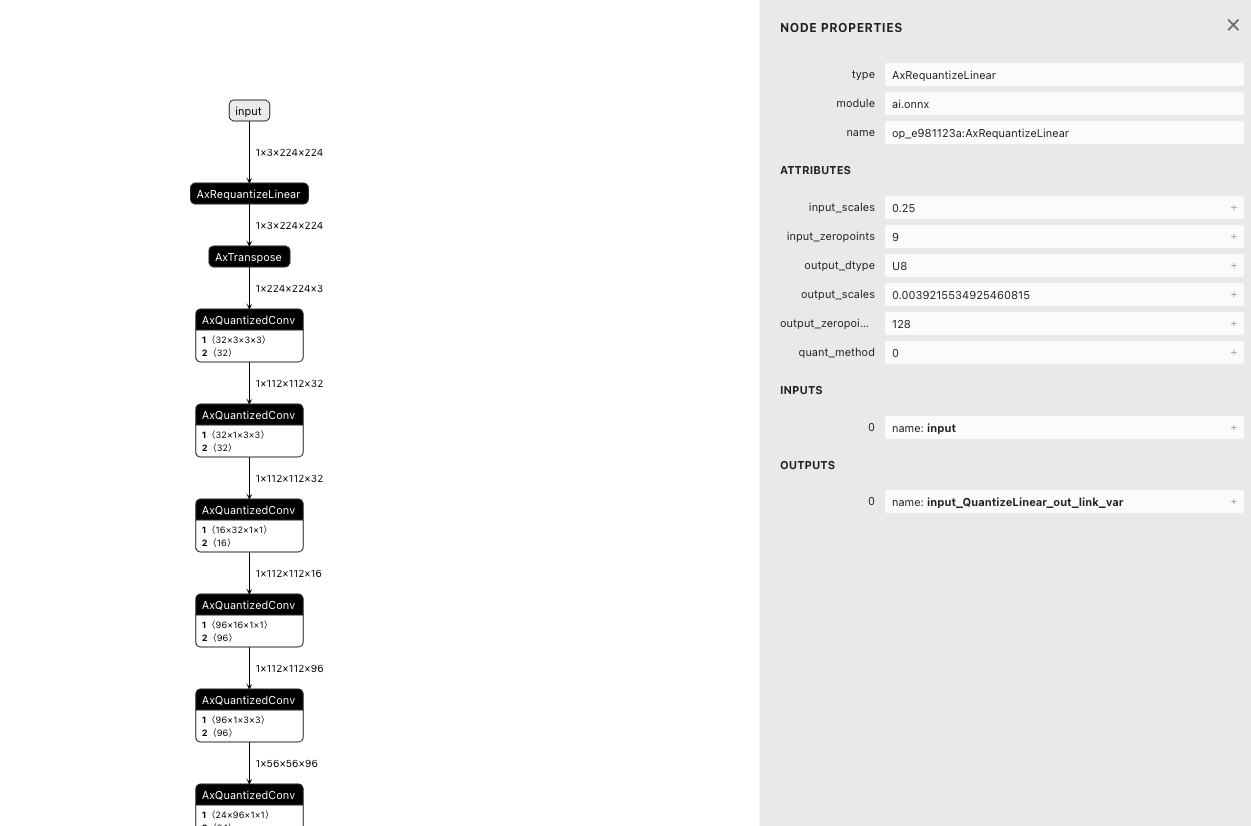
The AxRequantizeLinear node shows input_scales=0.25 and input_zeropoints=9, confirming that input_processors.scale and input_processors.zeropoint were written to the quantized frontend graph.#
5.8. Multi-input model configuration quantitative data set#
For models with multiple inputs, different inputs require different calibration sets, which can be achieved by modifying the configuration.
The field input_configs supports configuring multiple inputs. tensor_name is used to specify the input name of the model. The following is a configuration example:
{
  "quant": {
    "input_configs": [
      {
        "tensor_name": "input1", # 输入 1
        "calibration_dataset": "input1_dataset.tar",
        "calibration_size": 10,
        "calibration_mean": [103.939, 116.779, 123.68],
        "calibration_std": [58.0, 58.0, 58.0],
        "calibration_format": "Image", #
      },
      {
        "tensor_name": "input2", # 输入 2
        "calibration_dataset": "input2_dataset.tar",
        "calibration_size": 10,
        "calibration_mean": [103.939, 116.779, 123.68],
        "calibration_std": [58.0, 58.0, 58.0],
        "calibration_format": "Image",
      },
    ],
  }
}
In a multi-input model, different inputs may need to be matched in each batch. In this case, you can change the calibration sets of different inputs to the same batch to the same name. When quantizing, the inputs with the same name will be selected as one batch for quantization.
Taking the above configuration file as an example, the following is an example of the directory structure of the corresponding quantization file:
.
├── input1
│   ├── 1.bin
│   └── 2.bin
└── input2
    ├── 1.bin
    └── 2.bin
When the quantization module calibrates the data, it takes 1.bin of input1 and 1.bin of input2 as the first batch.
5.9. Multi-input model configuration quantization data set (NumpyObject)#
For models with multiple inputs, different inputs require different calibration sets, which can also be achieved by using NumpyObject.
The field input_configs supports configuring multiple inputs. tensor_name is used to specify the input name of the model. The following is a configuration example:
{
  "quant": {
    "input_configs": [
      {
        "tensor_name": "DEFAULT",
        "calibration_dataset": "dataset.tar",
        "calibration_size": -1,
        "calibration_format": "NumpyObject", # 数据类型
      },

    ],
  }
}
5.9.1. Prepare the dataset#
NumpyObject is a dictionary data type provided by Numpy. Dictionary data corresponds to input in the model, where key is the name of the input of the model.
value is the calibration data, and its type and shape should be the same as the corresponding input, that is, the data directly input to the model after preprocessing, and the format is numpy.ndarray.
The data processing of value is the same as 《Detailed Explanation of Loading Custom Datasets》.
Assume that the model has two inputs as shown below:

The following is a simple example of how to generate code:
import numpy as np

calib_data = {}
calib_data["rgb"] = np.random.randn(1, 2, 3, 224, 224).astype(np.float32)
calib_data["inst_emb"] = np.random.randn(1, 384).astype(np.float32)

np.save("data.npy", calib_data)
In a production environment, it is recommended to call the dataloader of the inference code, traverse it, convert the traversed data into the Numpy.ndarray type, and save it as a NumpyObject according to the dictionary, so that you can directly obtain the preprocessed data.
5.10. Detailed explanation of mixed precision quantization#
pulsar2 build supports mixed precision quantization, and you can set the quantization precision for a specified operator or a type of operator or a certain subgraph.
5.10.1. Configuration#
Modify the quant.layer_configs field. The currently supported enumerations for quantization precision are: U8 , U16 , FP32。
The following is an example configuration:
{
  "model_type": "ONNX",
  "npu_mode": "NPU1",
  "quant": {
    "input_configs": [
      {
        "tensor_name": "DEFAULT",
        "calibration_dataset": "./dataset/imagenet-32-images.tar",
        "calibration_size": 32,
        "calibration_mean": [103.939, 116.779, 123.68],
        "calibration_std": [58.0, 58.0, 58.0]
      }
    ],
    "layer_configs": [
        {
          "op_type": "Add", # specifies the quantization precision of operators of type Add
          "data_type": "U16"
        },
        {
          "op_types": ["Sub"], # specifies the quantization precision of operators of type Sub
          "data_type": "U16"
        },
        {
          "layer_name": "conv6_4", # specify the quantization precision of the conv6_4 operator
          "data_type": "U16"
        },
        {
          "layer_names": ["conv4_3"], # specify the quantization precision of the conv4_3 operator
          "data_type": "U16"
        },
        {
          # specify the quantization accuracy of the operators contained in the subgraph between conv2_1_linear_bn and relu2_2_dwise
          "start_tensor_names": "conv2_1_linear_bn",
          "end_tensor_names": "relu2_2_dwise",
          "data_type": "U16"
        }
    ],
    "calibration_method": "MinMax",
    "precision_analysis": false
  },
  "input_processors": [
    {
      "tensor_name": "input",
      "tensor_format": "BGR",
      "src_format": "BGR",
      "src_dtype": "U8",
      "src_layout": "NHWC",
      "csc_mode": "NoCSC"
    }
  ],
  "compiler": {
    "check": 0
  }
}
5.10.2. Sub-image configuration instructions#
When configuring a subgraph to a specific type, it is important to note that start_tensor_names and end_tensor_names specify tensor_name, not node_name.

If you want to configure the entire model for a certain quantization type, you can set start_tensor_names and end_tensor_names to [''DEFAULT'']. Here is an example:
{
  "layer_configs": [
      {
          "start_tensor_names": ["DEFAULT"], # string of list
          "end_tensor_names": ["DEFAULT"],   # string of list
          "data_type": "U16"
      }
    ]
}
The Conv type operator does not support the configuration of data_type as FP32, but its output can be configured to support FP32 separately, which can be achieved through the following configuration:
{
  "layer_configs": [
      {
        "op_type": "Conv",
        "data_type": "U8",
        "output_data_type": "FP32", # 配置输出为FP32, 该配置目前只对Conv算子生效
      }
    ]
}
The following is the configuration of the entire model except for Conv, and the rest of the operators are quantized to FP32:
{
  "layer_configs": [
      {
        "op_type": "Conv",
        "data_type": "U8",
        "output_data_type": "FP32", # 配置输出为FP32, 该配置目前只对Conv算子生效
      },
      {
          "start_tensor_names": ["DEFAULT"], # string of list
          "end_tensor_names": ["DEFAULT"],   # string of list
          "data_type": "FP32"
      }
    ]
}
Note
For an operator, there may be three quantization precision configurations: specified operator or a class of operators or a subgraph. The priority is:
specified operator > a class of operators > a subgraph
Attention
Currently, the FP32 configuration supports limited operators. The verified operators include LeayRelu Sigmoid Relu Add Mul Div
Sub Concat Softmax.
5.10.3. Compilation and results#
There will be a Layer Config Table when compiling to display the current layer_configs configuration.
root@aa:/data/quick_start_example# pulsar2 build --input model/mobilenetv2-sim.onnx --output_dir output --config config/mobilenet_v2_mix_precision_config.json
...
                                                                        Quant Config Table
┏━━━━━━━┳━━━━━━━━━━━━━━━━━━┳━━━━━━━━━━━━━━━━━━━┳━━━━━━━━━━━━━┳━━━━━━━━━━━━━━━┳━━━━━━━━━━━━━━━━━━━━━━━━━━━━━━━━━━━━━━━━━━━━━━━━━━━━━━━━━━━━━━┳━━━━━━━━━━━━━━━━━━━━┓
┃ Input ┃ Shape            ┃ Dataset Directory ┃ Data Format ┃ Tensor Format ┃ Mean                                                         ┃ Std                ┃
┡━━━━━━━╇━━━━━━━━━━━━━━━━━━╇━━━━━━━━━━━━━━━━━━━╇━━━━━━━━━━━━━╇━━━━━━━━━━━━━━━╇━━━━━━━━━━━━━━━━━━━━━━━━━━━━━━━━━━━━━━━━━━━━━━━━━━━━━━━━━━━━━━╇━━━━━━━━━━━━━━━━━━━━┩
│ input │ [1, 3, 224, 224] │ input             │ Image       │ BGR           │ [103.93900299072266, 116.77899932861328, 123.68000030517578] │ [58.0, 58.0, 58.0] │
└───────┴──────────────────┴───────────────────┴─────────────┴───────────────┴──────────────────────────────────────────────────────────────┴────────────────────┘
        Layer Config Table
┏━━━━━━━━━━━━━━━━━━━━━━┳━━━━━━━━━━━┓
┃ Op Type / Layer name ┃ Precision ┃
┡━━━━━━━━━━━━━━━━━━━━━━╇━━━━━━━━━━━┩
│ Add                  │ U16       │
├──────────────────────┼───────────┤
│ conv6_4              │ U16       │
└──────────────────────┴───────────┘
...
After compilation, a quant_axmodel.json file will be generated in the output/quant directory, which records the quantization configuration information of each operator. A part of it is excerpted below for use as an example.
"Add_26": {
  "507": {
    "bit_width": 16,
    "policy": {
      "PER_TENSOR": true,
      "PER_CHANNEL": false,
      "LINEAR": true,
      "EXPONENTIAL": false,
      "SYMMETRICAL": false,
      "ASYMMETRICAL": true,
      "POWER_OF_2": false
    },
    "state": "ACTIVATED",
    "quant_min": 0,
    "quant_max": 65535,
    "hash": 762206185,
    "dominator": 762206185
  },
  "516": {
    "bit_width": 16,
    "policy": {
      "PER_TENSOR": true,
      "PER_CHANNEL": false,
      "LINEAR": true,
      "EXPONENTIAL": false,
      "SYMMETRICAL": false,
      "ASYMMETRICAL": true,
      "POWER_OF_2": false
    },
    "state": "OVERLAPPED",
    "quant_min": 0,
    "quant_max": 65535,
    "hash": 3471866632,
    "dominator": 4099361028
  }
}
5.11. Enter size modification#
By modifying the configuration file, the dimensions of each input can be modified during the model conversion process.
Next, based on mobilenetv2, modify the model input to 384*384
Command line mode, add parameters:
--input_shapes data:1x3x384x384Configuration file method, add parameters to the root node:
{
   ...
   "input_shapes": "data:1x3x384x384",
   ...
}
During the model conversion process, the following log will appear, indicating that the model input size has been modified successfully:
INFO[0006] 2023-08-24 20:04:59.530 | WARNING | yamain.command.load_model:optimize_onnx_model:640 - change input shape to {'data': (1, 3, 384, 384)}
Note
The model input size modification occurs before quantization, and the size of the quantized dataset needs to be consistent with the modified size.
Multiple input groups are separated by semicolons. For details, refer to the parameter explanation section.
5.12. Configure model additional input dimensions#
By configuring the model compilation process, in addition to the main dimensions of the original model, additional sets of dimensions can be output. These dimensions will be saved in the same compiled.axmodel.
The same set of weight data will be reused between multiple groups of sizes (the quantization tool will quantize the model based on its original size). Users need to evaluate the accuracy issues that may be caused by the difference between the size during quantization and the size during inference.
Next, we will take mobilenetv2 as an example. Based on the original input size 224*224, we will add an additional size 384*384, and then select the size for simulation through the pulsar2 run tool.
Modify the configuration file. In the
input_processorsnode, configure asrc_extra_shapeschild node for the input:
{
  ...
  "input_processors": [
    {
      "tensor_name": "DEFAULT",
      "tensor_format": "BGR",
      "src_format": "BGR",
      "src_dtype": "U8",
      "src_layout": "NHWC",
      "src_extra_shapes": [
        {
          "shape": [1, 3, 384, 384]
        }
      ],
      "csc_mode": "NoCSC",
      "csc_mat": [
        1.164, 2.017, 0, -276.8, 1.164, -0.392, -0.813, 135.616, 1.164, 0,
        1.596, -221.912
      ]
    }
  ],
  ...
}
During the model compilation process, the following log appears to confirm that the configuration is effective:
2024-01-01 21:27:02.082 | INFO | yamain.command.build:compile_ptq_model:973 - extra input shape, index: 1, shape: {'data': (1, 3, 384, 384)}
After compilation,
compiled.axmodelwill contain two subgraphs of independent sizes, which can be used for inference separately.

pulsar2 runincludes--group_indexparameter, which is used to select sub-graphs of different sizes for simulation. The default value of this parameter is 0, which corresponds to the sub-graph of the original resolution (224*224). 1 corresponds to the sub-graph of the additional resolution (384*384).AXEngineFor how to select different sizes when inferring models with additional input sizes, please refer to theAXEngine documentation.
5.13. Operator attribute modification#
By modifying the configuration file, the properties of a specific operator can be modified during the model conversion process.
Next, based on mobilenetv2, modify the ceil_mode of the AveragePool operator named pool6 to 1, and add the following content to the configuration file:
"op_processors": [
  {
    "op_name": "pool6",
    "attrs": {
      "ceil_mode": 1
    }
  }
],
When using pulsar2 build to convert the model, the following log will appear, indicating that the operator attributes have been modified successfully:
2023-05-07 18:47:34.274 | INFO | yamain.command.load_model:op_attr_patch:488 - set op [pool6] attr [ceil_mode] to 1
5.14. Constant data modification#
By modifying the configuration file, specific constant data can be modified during the model conversion process.
Assume that a model contains a Reshape operator named reshape_0. The shape input of this operator is a constant data named reshape_0_shape, and the original data is `` [1, 96, 48]``.
Add the following content to the configuration file to modify the constant data to [-1, 96, 48].
"const_processors": [
  {
    "name": "reshape_0_shape",
    "data": [-1, 96, 48]
  }
],
When using pulsar2 build to convert the model, the following log will appear, indicating that the constant data has been modified successfully:
2023-05-07 18:15:41.464 | WARNING | yamain.command.load_model:const_patch:512 - update data of const tensor [reshape_0_shape], (-1,, 96, 48), S64
5.15. Set separate compilation options for subgraphs#
By modifying the configuration file, you can set separate compilation options for the specified subgraph during the model conversion process.
Add a
sub_configsnode under thecompilernode of the configuration file. By configuringstart_tensor_namesandend_tensor_namesinformation undersub_configs, you can specify the subgraph range that needs to configure compilation options separately.The subgraph range configurations
start_tensor_namesandend_tensor_namesneed to be the tensor names in the model after the toolchain front-end graph is optimized. When compiling, set--debug.dump_frontend_graphto save the front-end optimized model in the output directoryfrontend/optimzied_quant_axmodel.onnx. Use tools such asNetronto view the model information and determine the start and end tensor names of the subgraph.All compilation options that can be configured under the
compilernode (exceptsub_configs) can be configured in the subgraph compilation options.The subgraph compilation options that are not explicitly configured will inherit the configuration under the
compilernode. For example, ifcheckis configured to 1 in thecompilernode, andcheckis not explicitly configured in the subgraph compilation options, the subgraph will inherit the configuration of thecompilernode, and the value ofcheckwill be 1.The subgraph that is configured with a separate compilation option will form a separate subgraph in the compilation result
compiled.axmodel.
Next, based on mobilenetv2, we will demonstrate the function of sub-graph separate compilation option:
Add the compilation option
--debug.dump_frontend_graphin the original process, re-execute pulsar2 build, and then use theNetrontool to open thefrontend/optimzied_quant_axmodel.onnxfile in the output directory.Confirm the subgraph range for configuring the compilation option separately. In the example, the subgraph starts with the tensor name
op_37:AxQuantizedConv_outand ends with the tensor nameop_5:AxQuantizedConv_out.
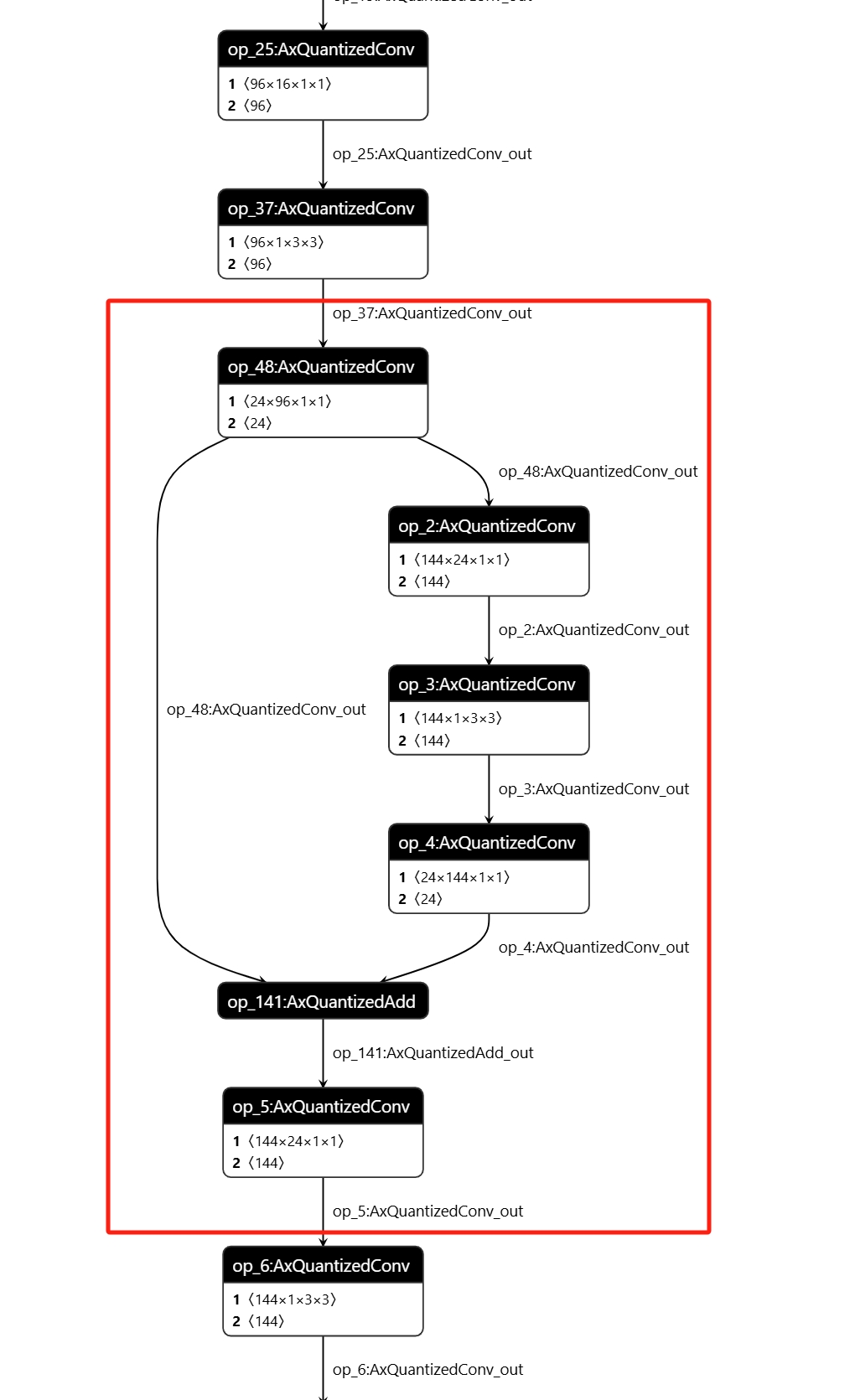
Add the following content under the
compilernode in the configuration file:
"sub_configs": [
  {
    "start_tensor_names": ["op_37:AxQuantizedConv_out"],
    "end_tensor_names": ["op_5:AxQuantizedConv_out"],
    "check": 2
  }
]
Using pulsar2 build to convert the model will result in the following log:
2024-12-10 14:38:30.487 | INFO     | yamain.command.build:compile_ptq_model:1139 - subgraph [0], group: 0, type: GraphType.NPU
2024-12-10 14:38:30.487 | INFO     | yamain.command.build:compile_ptq_model:1139 - subgraph [1], group: 0, type: GraphType.NPU
2024-12-10 14:38:30.487 | INFO     | yamain.command.build:compile_ptq_model:1139 - subgraph [2], group: 0, type: GraphType.NPU
This indicates that due to the subgraph configuration compilation option, the model was split into three parts for compilation, and the following log was generated when compiling subgraph 1:
2024-12-10 14:38:30.694 | INFO     | yamain.command.npu_backend_compiler:compile:157 - compile npu subgraph [1]
tiling op...   ━━━━━━━━━━━━━━━━━━━━━━━━━━━━━━━━━━━━━━━━━━━━━━━━━━━━━━━━━━━━━━━━━━━━━━━━━━━━━━━━━━━━━━━━━━━━━━━━━━━━━━━━━━━━━━━━━━━━━━━━━━━━━━━━━━━━━━━━━━━━━━━━━━━━━━━━━━━━━━━━━━━━━━━━━━━━━━━━━━━━━━━ 6/6 0:00:00
new_ddr_tensor = []
build op serially...   ━━━━━━━━━━━━━━━━━━━━━━━━━━━━━━━━━━━━━━━━━━━━━━━━━━━━━━━━━━━━━━━━━━━━━━━━━━━━━━━━━━━━━━━━━━━━━━━━━━━━━━━━━━━━━━━━━━━━━━━━━━━━━━━━━━━━━━━━━━━━━━━━━━━━━━━━━━━━━━━━━━━━━━━━━━━━━ 26/26 0:00:00
build op...   ━━━━━━━━━━━━━━━━━━━━━━━━━━━━━━━━━━━━━━━━━━━━━━━━━━━━━━━━━━━━━━━━━━━━━━━━━━━━━━━━━━━━━━━━━━━━━━━━━━━━━━━━━━━━━━━━━━━━━━━━━━━━━━━━━━━━━━━━━━━━━━━━━━━━━━━━━━━━━━━━━━━━━━━━━━━━━━━━━━━━━━ 46/46 0:00:00
add ddr swap...   ━━━━━━━━━━━━━━━━━━━━━━━━━━━━━━━━━━━━━━━━━━━━━━━━━━━━━━━━━━━━━━━━━━━━━━━━━━━━━━━━━━━━━━━━━━━━━━━━━━━━━━━━━━━━━━━━━━━━━━━━━━━━━━━━━━━━━━━━━━━━━━━━━━━━━━━━━━━━━━━━━━━━━━━━━━━━━━━━━━ 45/45 0:00:00
calc input dependencies...   ━━━━━━━━━━━━━━━━━━━━━━━━━━━━━━━━━━━━━━━━━━━━━━━━━━━━━━━━━━━━━━━━━━━━━━━━━━━━━━━━━━━━━━━━━━━━━━━━━━━━━━━━━━━━━━━━━━━━━━━━━━━━━━━━━━━━━━━━━━━━━━━━━━━━━━━━━━━━━━━━━━━━━━━ 56/56 0:00:00
calc output dependencies...   ━━━━━━━━━━━━━━━━━━━━━━━━━━━━━━━━━━━━━━━━━━━━━━━━━━━━━━━━━━━━━━━━━━━━━━━━━━━━━━━━━━━━━━━━━━━━━━━━━━━━━━━━━━━━━━━━━━━━━━━━━━━━━━━━━━━━━━━━━━━━━━━━━━━━━━━━━━━━━━━━━━━━━━ 56/56 0:00:00
assign eu heuristic   ━━━━━━━━━━━━━━━━━━━━━━━━━━━━━━━━━━━━━━━━━━━━━━━━━━━━━━━━━━━━━━━━━━━━━━━━━━━━━━━━━━━━━━━━━━━━━━━━━━━━━━━━━━━━━━━━━━━━━━━━━━━━━━━━━━━━━━━━━━━━━━━━━━━━━━━━━━━━━━━━━━━━━━━━━━━━━━ 56/56 0:00:00
assign eu onepass   ━━━━━━━━━━━━━━━━━━━━━━━━━━━━━━━━━━━━━━━━━━━━━━━━━━━━━━━━━━━━━━━━━━━━━━━━━━━━━━━━━━━━━━━━━━━━━━━━━━━━━━━━━━━━━━━━━━━━━━━━━━━━━━━━━━━━━━━━━━━━━━━━━━━━━━━━━━━━━━━━━━━━━━━━━━━━━━━━ 56/56 0:00:00
assign eu greedy   ━━━━━━━━━━━━━━━━━━━━━━━━━━━━━━━━━━━━━━━━━━━━━━━━━━━━━━━━━━━━━━━━━━━━━━━━━━━━━━━━━━━━━━━━━━━━━━━━━━━━━━━━━━━━━━━━━━━━━━━━━━━━━━━━━━━━━━━━━━━━━━━━━━━━━━━━━━━━━━━━━━━━━━━━━━━━━━━━━ 56/56 0:00:00
2024-12-10 14:38:30.823 | INFO     | yasched.test_onepass:results2model:2593 - clear job deps
2024-12-10 14:38:30.823 | INFO     | yasched.test_onepass:results2model:2594 - max_cycle = 81,026
build jobs   ━━━━━━━━━━━━━━━━━━━━━━━━━━━━━━━━━━━━━━━━━━━━━━━━━━━━━━━━━━━━━━━━━━━━━━━━━━━━━━━━━━━━━━━━━━━━━━━━━━━━━━━━━━━━━━━━━━━━━━━━━━━━━━━━━━━━━━━━━━━━━━━━━━━━━━━━━━━━━━━━━━━━━━━━━━━━━━━━━━━━━━━ 56/56 0:00:00
2024-12-10 14:38:30.847 | INFO     | yamain.command.npu_backend_compiler:compile:209 - assemble model [1] [subgraph_npu_1] b1
2024-12-10 14:38:30.890 | INFO     | yamain.command.npu_backend_compiler:compile:228 - generate gt of npu graph [subgraph_npu_1]
2024-12-10 14:38:31.797 | INFO     | yamain.command.npu_backend_compiler:check_assembled_model:376 - simulate npu graph [subgraph_npu_1_b1]
2024-12-10 14:38:32.352 | SUCCESS  | yamain.common.util:check_data:206 - check npu graph [subgraph_npu_1_b1] [op_5:AxQuantizedConv_out], (1, 56, 56, 144), uint8 successfully!
It can be seen that when compiling subgraph 1, the output result is checked because the check option configuration is turned on.
Three NPU sub-models also appear in the final output
compiled.axmodel. The names of the tensors that split the three models are the names specified in the sub-graph compilation options.
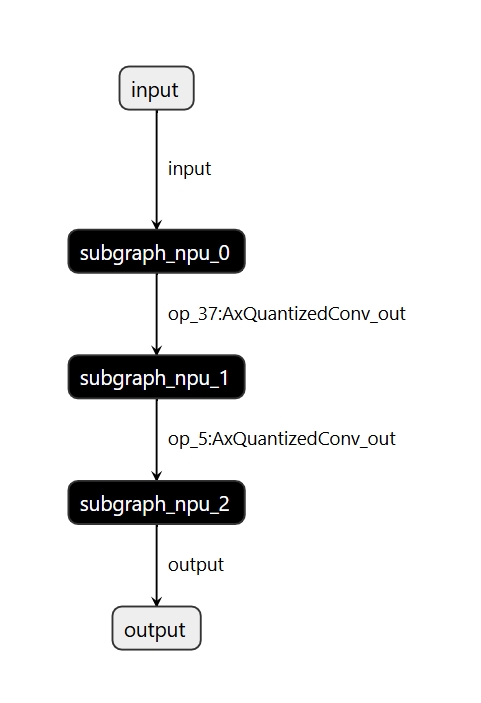
5.16. Transformer model configuration details#
For the Transformer model, you can set different levels of optimization through quant.transformer_opt_level.
Currently, three levels of settings 0, 1, and 2 are supported.
The following is an example of the Swin-T model, the configuration is as follows
"quant": {
    "input_configs": [
      {
        "tensor_name": "DEFAULT",
        "calibration_dataset": "dataset.tar",
        "calibration_format": "Image",
        "calibration_size": 32,
        "calibration_mean": [123.68, 116.779, 103.939],
        "calibration_std": [58.62, 57.34, 57.6]
      }
    ],
    "calibration_method": "MSE",
    "transformer_opt_level": 2 # set the transformer optimization level to 2
},
When using pulsar2 build to convert the model, the following log will appear, indicating that the configuration modification is successful:
INFO[0176] Transformer optimize level: 2
The following table shows the accuracy and performance of Swin-T under different optimization levels. The floating point accuracy (acc1) of this model is 81.2%
Optimization level |
Accuracy(acc1) |
time consuming |
|---|---|---|
1 |
80.488% |
7.266ms |
2 |
80.446% |
7.114ms |
Note
The current version recommends setting level 1. In actual measurements, level 2 has a smaller performance improvement than level 1, while the accuracy of level 1 is slightly better.
Note
The models that have been verified so far include Swin series, SwinV2 series, Deit series, and Vit series.
5.17. Quantized ONNX model import#
In order to support customers' self-quantized models (including 4-bit QAT quantization), AX650 and M76H support quantized models in Quantized ONNX format as input. The model format uses ONNX QDQ format.
The following takes the resnet50 and yolov5s 4w8f models as examples to demonstrate how to compile models in Quantized ONNX format.
First, please download the model we have converted, Click to download resnet50, Click to download yolov5s
Then use the following configuration file for resnet50:
{
  "model_type": "QuantONNX",
  "npu_mode": "NPU1",
  "quant": {
    "input_configs": [
      {
        "tensor_name": "DEFAULT",
        "calibration_dataset": "s3://npu-ci/data/dataset_v04.zip",
        "calibration_size": 64,
        "calibration_mean": [103.939, 116.779, 123.68],
        "calibration_std": [1.0, 1.0, 1.0]
      }
    ],
    "calibration_method": "MinMax"
  },
  "input_processors": [
    {
      "tensor_name": "data",
      "src_format": "BGR",
      "src_dtype": "U8",
      "src_layout": "NHWC"
    }
  ],
  "compiler": {
    "check": 0
  }
}
Finally, use the pulsar2 build command to compile, and you will get the compiled.axmodel file.
pulsar2 build --target_hardware AX650 --input path/to/model.onnx --config path/to/config.json --output_dir output
Hint
Specify the input model type as Quantized ONNX through "model_type": "QuantONNX" in the configuration file.
Using a similar method, we can compile the yolov5s Quantized ONNX format model. We only need to replace it with the following configuration file for compilation:
{
  "model_type": "QuantONNX",
  "npu_mode": "NPU1",
  "quant": {
    "input_configs": [
      {
        "tensor_name": "DEFAULT",
        "calibration_dataset": "s3://npu-ci/data/coco_calib_image.tar",
        "calibration_size": 32,
        "calibration_mean": [0, 0, 0],
        "calibration_std": [255.0, 255.0, 255.0]
      }
    ],
    "layer_configs": [
      {
        "op_type": "Silu",
        "data_type": "U16"
      }
    ],
    "calibration_method": "MSE"
  },
  "input_processors": [
    {
      "tensor_name": "DEFAULT",
      "tensor_format": "RGB",
      "tensor_layout": "NCHW",
      "src_format": "BGR",
      "src_layout": "NHWC",
      "src_dtype": "U8"
    }
  ],
  "compiler": {
    "check": 0
  }
}
5.18. Color space conversion configuration#
Support customers to add color space conversion function in the model through configuration, and the NPU completes the conversion from YUV to RGB. For detailed configuration, please refer to Pre-processing and Post-processing Parameters <processing_arg_details>
{
  "input_processors": [
    {
      "tensor_name": "DEFAULT",
      "tensor_format": "BGR",
      "src_format": "YUV420SP",   # Specify the input color space of the compiled model
      "src_dtype": "U8",
      "src_layout": "NHWC",
      "csc_mode": "LimitedRange"
    }
  ]
}
Attention
Conversion from RGB to BGR or BGR to RBG is currently not supported.
5.19. Detailed explanation of advanced quantitative strategy configuration#
Supports customers to configure advanced quantitative strategies. Currently, it supports quantitative strategies such as ADAROUND, LSQ, and BRECQ. These quantitative strategies can often achieve better accuracy by fine-tuning weights and activation values on the data set.
When using it, the machine needs to have a GPU that supports CUDA. When starting docker, it is also necessary to add support for gpu. The reference command is as follows:
sudo docker run -it --net host --rm --runtime=nvidia --gpus all -v $PWD:/data pulsar2:${version}
The configuration reference is as follows:
{
  "quant": {
    "input_configs": [
      {
        "tensor_name": "DEFAULT",
        "calibration_dataset": "dataset.tar",
        "calibration_format": "Binary", # It is recommended to use binary to ensure consistency between preprocessing and inference, so that fine-tuning is close to the floating-point model and better accuracy is achieved.
        "calibration_size": 128, # calibration size, recommended 128-512 cards
      }
    ],
    "calibration_method": "MinMax",
    "enable_adaround": true, # Enable adaround quantization strategy
    "finetune_block_size": 3, # Setting block size
    "finetune_lr": 1e-4, # Setting the learning rate
    "finetune_epochs": 100, # Set fine-tuning epoch, lsq and brecq are recommended to be set to 10, and adaround is recommended to be set to 50
    "device": "cuda:0"
},
When the following log appears, it means that the policy is set successfully:
Calibration Progress(Phase 1): 100%|███████████████████████████████████████████████████████████████████| 128/128 [00:01<00:00, 20.16it/s]
[16:40:41] AX Adaround Reconstruction Running ...

Check following parameters:
Is Scale Trainable:        True
Interested Layers:         []
Collecting Device:         cuda
Num of blocks:             51
Learning Rate:             0.0001
Steps:                     50
Gamma:                     1.0
Batch Size:                1

# Block [1 / 51]: [['207'] -> ['211']]
# Tuning Procedure : 100%|█████████████████████████████████████████████████████████████████████████████| 50/50 [00:11<00:00,  4.55it/s]
# Tuning Finished  : (0.0185 -> 0.0065) [Block Loss]

# Block [2 / 51]: [['211'] -> ['213']]
# Tuning Procedure : 100%|█████████████████████████████████████████████████████████████████████████████| 50/50 [00:06<00:00,  8.23it/s]
# Tuning Finished  : (0.0014 -> 0.0011) [Block Loss]
Attention
The current torch version in docker is 2.5, and the cuda version is 11.8. When using them, you need to pay attention to whether the machine is compatible.